
Best for storybook creators
Fast summary before you begin.
How to Use Kre8or for Children’s Book Illustrations
🚀 Create Better Visual Content with AI
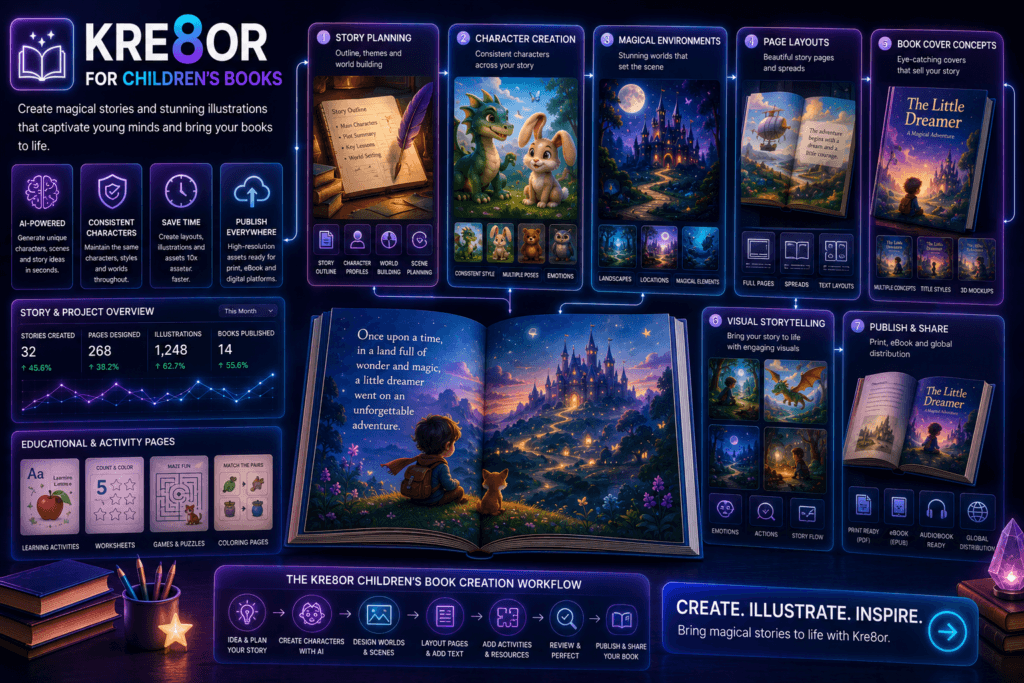
Children’s books depend on visual consistency. Readers should recognize the same characters, environments, colors, and emotional tone from page to page.
Kre8or can help authors and illustrators explore character concepts, story settings, cover directions, and scene planning.
AI should support thoughtful storytelling and human review, especially when creating content for children.
If you would like to follow along, create a free Kre8or account and start experimenting with your own ideas.
👉 Create Your Free Kre8or Account
Why Consistency Matters
A character who changes appearance from page to page can confuse young readers and weaken the story world.
Create a visual reference before producing final scenes.
- Character appearance
- Clothing
- Color palette
- Environment style
- Emotional tone
Develop Character Reference Sheets
Define the character’s age, clothing, proportions, colors, personality, and recurring accessories.
Use the same reference language in every future prompt.
- Front view
- Side view
- Common expressions
- Signature outfit
- Important props
Plan the Story Before Generating Scenes
Create a page-by-page list of locations, characters, actions, and emotions.
This prevents random generation and helps maintain continuity.
- Opening scene
- Problem
- Journey
- Climax
- Resolution
Create Consistent Environments
Recurring locations should maintain recognizable architecture, colors, lighting, and objects.
Save prompts for homes, classrooms, forests, towns, or fantasy worlds.
- Home
- School
- Forest
- Town
- Fantasy world
Practical Creative Workflow
Design Cover Concepts
A cover should communicate the story’s mood and main subject at a glance.
Keep the composition simple enough to leave room for the title and author name.
- Character-focused cover
- Environment-focused cover
- Adventure scene
- Quiet emotional moment
Refine and Review Every Image
Check anatomy, expressions, continuity, background details, and age appropriateness.
Human review is essential before publication.
- Character match
- Scene accuracy
- Visual safety
- Print readability
- Consistent style
Common Illustration Mistakes
A coherent storybook is more valuable than a collection of individually impressive but inconsistent images.
- Changing character details
- Different art styles
- Overly complex scenes
- Unreadable compositions
- Skipping human review
Improve Your Results with Better Prompts
Describe the subject, purpose, mood, color palette, lighting, composition, and the space you need for real text. Generate multiple versions and compare them before choosing a final direction.
Frequently Asked Questions
Can Kre8or create consistent book characters?
Kre8or Characters can support consistency, but every image should still be reviewed carefully for clothing, proportions, colors, and facial details.
Can AI illustrations be published commercially?
Commercial use depends on current platform terms, publishing requirements, and applicable law. Review all licensing conditions before publication.
Should I add book text inside generated images?
It is usually better to add final text with professional layout software so spelling, readability, and placement remain accurate.
Related Kre8or Guides
- ⭐ Kre8or Character Creation
- ⭐ Kre8or Styles Explained
- ⭐ How to Write Better AI Prompts
- ⭐ Kre8or Workshops Explained
Final Thoughts
Kre8or can make the creative side of this workflow faster, but the strongest results still come from clear goals, honest messaging, consistent branding, and careful human review.
Start with one useful campaign, test several visual concepts, and save the prompts that best match your brand.
🚀 Ready to Start Creating?
Create original branded visuals, organize your strongest ideas, and build a repeatable workflow with Kre8or.
Try Kre8or Free