
Kre8or vs Adobe Firefly: Which AI Image Generator Is Better?

Introduction
Artificial intelligence has transformed digital design.
Whether you’re creating blog graphics, marketing visuals, concept art, or commercial illustrations, AI can now generate professional-quality images in minutes.
Two platforms taking very different approaches are Kre8or and Adobe Firefly.
Adobe Firefly was built to integrate with the Adobe Creative Cloud ecosystem, making it especially attractive to designers already using Photoshop, Illustrator, and Express.
Kre8or takes a different path.
Instead of integrating into traditional design software, it provides a dedicated creative platform where AI image generation becomes part of a larger creator ecosystem built around Studio, Workshops, public Galleries, remixing, creator profiles, and Design Challenges.
If you’re still learning about Kre8or, our Kre8or AI Review provides a complete overview before diving into this comparison.
The question isn’t simply:
Which AI creates better images?
It’s:
Which platform fits the way you create?
🚀 Ready to Explore Kre8or?
The best way to understand Kre8or is to create with it yourself.
With a free account you can explore:
✅ Studio
✅ Workshops
✅ Public Gallery
✅ Character Creation
✅ Design Challenges
👉 Create Your Free Kre8or Account
📌 At a Glance
| Looking for… | Best Choice |
|---|---|
| Photoshop workflow | ⭐ Adobe Firefly |
| Creative Cloud integration | ⭐ Adobe Firefly |
| Commercial marketing assets | ⭐ Adobe Firefly |
| Original AI artwork | ⭐ Kre8or |
| Character creation | ⭐ Kre8or |
| Creative community | ⭐ Kre8or |
| Guided image improvements | ⭐ Kre8or |
| Creator profiles | ⭐ Kre8or |
| Design Challenges | ⭐ Kre8or |
| Long-term creative ecosystem | ⭐ Kre8or |
Quick Comparison
| Feature | Kre8or | Adobe Firefly |
|---|---|---|
| AI Image Generation | ✅ | ✅ |
| Studio Workspace | ✅ | ❌ |
| Workshops | ✅ | ❌ |
| Public Gallery | ✅ | ❌ |
| Creator Profiles | ✅ | ❌ |
| Remix System | ✅ | ❌ |
| Design Challenges | ✅ | ❌ |
| Photoshop Integration | ❌ | ✅ |
| Creative Cloud Integration | ❌ | ✅ |
| Commercial Design Workflow | Limited | ✅ |
Philosophy: Creator Platform vs Design Ecosystem
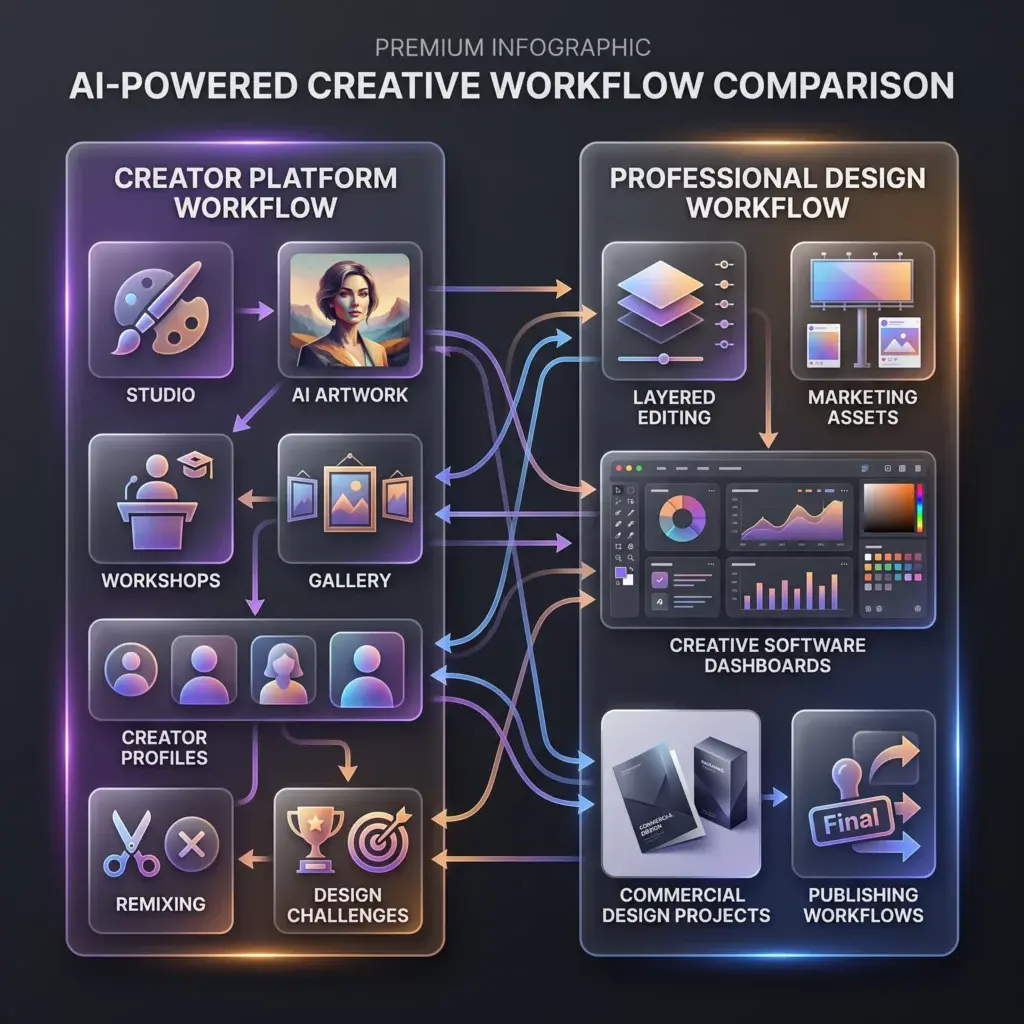
Although both platforms use AI to generate images, they’re built for very different creators.
Adobe Firefly
Adobe Firefly extends Adobe’s existing creative ecosystem.
Its goal is helping designers produce AI-assisted content that fits naturally into workflows involving:
- Photoshop
- Illustrator
- Adobe Express
- InDesign
- Marketing campaigns
- Commercial graphics
AI becomes another design tool inside a familiar professional environment.
Kre8or
Kre8or starts with creativity.
Instead of building around existing design software, it creates an environment where artwork can evolve through:
- Studio
- Workshops
- Gallery
- Creator Profiles
- Remixing
- Design Challenges
Rather than focusing on production pipelines, Kre8or focuses on helping creators grow through experimentation and community.
If you’d like to see how this workflow operates, our How to Use Kre8or Studio guide walks through the complete image creation process.
AI Image Generation
Both platforms generate high-quality AI artwork.
However, their priorities are very different.
Adobe Firefly
Firefly is designed for commercial creators.
It excels at producing visuals that fit naturally into:
- Marketing materials
- Advertising
- Product concepts
- Website graphics
- Business presentations
- Commercial campaigns
Its close integration with Adobe software makes it easy to continue editing after generation.
Kre8or
Kre8or focuses on original artistic creation.
Creators can:
- Generate unique artwork
- Experiment with multiple artistic styles
- Build recurring characters
- Refine images using Workshops
- Publish work publicly
Rather than ending with image generation, creators can continue developing artwork inside the platform.
If you’re interested in creating consistent visual identities, our Kre8or Character Creation guide explains how recurring characters can be developed across multiple projects.
Winner
🤝 Depends on your workflow
Adobe Firefly is ideal for designers already working inside Creative Cloud.
Kre8or is ideal for creators looking for a dedicated AI art platform with community-driven features.
Commercial Design Workflow
This is where Adobe Firefly separates itself.
Adobe Firefly
Adobe Firefly integrates directly into professional design workflows.
Designers can generate assets and continue refining them inside familiar Adobe applications without changing platforms.
This makes Firefly particularly attractive for agencies, businesses, and professionals already invested in Adobe Creative Cloud.
Kre8or
Kre8or emphasizes creative exploration before production.
Studio and Workshops help creators generate and improve artwork, while Galleries and Design Challenges encourage long-term engagement rather than simply delivering finished marketing assets.
For bloggers, marketers, and entrepreneurs, our Kre8or for Bloggers, Kre8or for Small Businesses, and Kre8or for Social Media Managers guides demonstrate how original AI artwork can strengthen online content.
Winner
🏆 Depends on your goals
Editing & Creative Control

Generating an image is only the beginning.
Professional creators often spend far more time refining artwork than generating it.
This is one area where Adobe Firefly and Kre8or take very different approaches.
Adobe Firefly
Adobe Firefly is designed to fit naturally into existing creative workflows.
After generating an image, designers can continue working inside Adobe applications using familiar editing tools.
Depending on the application, this may include:
- Removing objects
- Generative Fill
- Background replacement
- Color adjustments
- Layer editing
- Image expansion
- Typography refinement
Rather than exporting images into another platform, creators can continue working within the Adobe ecosystem.
For professional designers already using Creative Cloud every day, this creates a seamless workflow.
Kre8or
Kre8or approaches refinement differently.
Instead of providing a traditional image editor, it introduces Workshops.
Workshops analyze an existing image and recommend creative improvements such as:
- Better lighting
- Improved composition
- Background enhancements
- Mood adjustments
- Artistic style changes
Rather than manually editing layers, creators receive guided creative suggestions that help improve artwork without requiring advanced design skills.
Our Kre8or Workshops Explained guide walks through this process in detail.
Winner
🏆 Depends on your workflow
Choose Adobe Firefly for professional editing.
Choose Kre8or for guided creative refinement.
Community & Creative Inspiration
This is one of the biggest differences between the platforms.
Adobe Firefly
Adobe Firefly is primarily a professional design tool.
Its purpose is helping creators generate assets that fit into commercial design projects.
While Adobe offers community resources through Creative Cloud, Firefly itself isn’t built around public creator profiles, remixing, or ongoing creative interaction.
Most projects begin and end with the designer.
Kre8or
Kre8or treats every creation as part of a growing creative ecosystem.
Creators can:
- Publish artwork to the Gallery
- Build public creator profiles
- Remix existing artwork
- Follow other creators
- Participate in Design Challenges
- Gain visibility within the community
Instead of finishing when an image is generated, creativity continues through collaboration.
Our Kre8or Gallery Explained guide explores how creators discover artwork, while Kre8or Remix System Explained explains how remixing encourages ongoing creative development.
Winner
🏆 Kre8or
Commercial Use
Many creators choose an AI image generator based on how easily they can use images in commercial projects.
Adobe Firefly
Commercial content has been one of Adobe Firefly’s primary focus areas.
Because Adobe built Firefly for professional creators and businesses, it integrates naturally into commercial design workflows involving:
- Advertising
- Marketing campaigns
- Product design
- Branding
- Client projects
- Print materials
Its Creative Cloud integration makes it particularly attractive for agencies and professional design teams.
Kre8or
Kre8or also supports commercial creation through eligible subscription plans.
Beyond generating artwork, the platform encourages creators to develop original visual identities through:
- Character Creation
- Workshops
- Creator Profiles
- Community participation
For bloggers, YouTubers, entrepreneurs, and marketers, this provides a workflow centered around producing distinctive original content.
If you’re comparing plans, our Kre8or Pricing Explained guide explains commercial rights, credits, and subscription options.
Winner
🤝 Tie
Adobe Firefly integrates more naturally into enterprise workflows.
Kre8or emphasizes original creative production for independent creators.
Learning Curve
Both platforms are approachable, but they’re designed for different audiences.
Adobe Firefly
If you’re already familiar with Adobe applications, Firefly feels like a natural extension of tools you already know.
Professional designers can integrate AI into existing workflows with relatively little adjustment.
New users, however, may find the broader Creative Cloud ecosystem takes time to master.
Kre8or
Kre8or focuses entirely on AI creativity.
Studio keeps image generation organized, while Workshops reduce the need for complex prompt engineering.
Although creators will eventually explore Galleries, Challenges, and Remixing, the core creative workflow is straightforward.
If you’re just getting started, our 25 Kre8or Tips and Tricks Every Creator Should Know guide can help you produce better results more quickly.
Winner
🏆 Kre8or
For beginners interested primarily in AI image creation.
Who Should Choose Each Platform?
Your ideal platform depends on the type of creative work you do.
Choose Adobe Firefly if you:
✔ Already use Photoshop or Illustrator.
✔ Work inside Adobe Creative Cloud every day.
✔ Create commercial marketing materials.
✔ Need professional editing workflows.
✔ Work with agency or enterprise clients.
Choose Kre8or if you:
✔ Want a dedicated AI creative platform.
✔ Enjoy community interaction.
✔ Build recurring characters.
✔ Want guided creative improvements.
✔ Like Design Challenges.
✔ Want your artwork to continue evolving through Galleries and remixing.
Related Reading
Interested in learning more about Kre8or? These guides explore many of the features discussed throughout this comparison:
- ⭐ Kre8or AI Review — A complete overview of the platform.
- 🛠️ How to Use Kre8or Studio — Learn the dedicated image creation workspace.
- ✨ Kre8or Workshops Explained — Discover guided image enhancements.
- 🖼️ Kre8or Gallery Explained — Explore the public creative community.
- 💳 Kre8or Pricing Explained — Compare plans, credits, and commercial rights.
- 📱 Kre8or for Social Media Managers — See how creators use Kre8or for ongoing visual content.
- 📝 Kre8or for Bloggers — Learn how bloggers can streamline image creation.Pros & Cons
Pros & Cons
Kre8or and Adobe Firefly are both powerful AI image generation platforms, but they serve different audiences.
Adobe Firefly is built for professional designers already working inside the Adobe ecosystem.
Kre8or is built for creators who want a complete AI-powered creative platform with community features and long-term creative growth.
The best choice depends on how you work.
Kre8or
Pros
✅ Dedicated AI Creative Platform
Kre8or isn’t simply an AI image generator.
It’s an entire creative environment designed around producing, improving, sharing, and evolving original artwork.
Creators can move seamlessly between:
- Studio
- Workshops
- Gallery
- Creator Profiles
- Design Challenges
rather than stopping once an image has been generated.
✅ Studio Makes Image Creation Organized
Instead of relying on an open chat interface, Kre8or’s Studio provides a structured workspace where prompts, artistic styles, composition, and rendering settings are organized into a focused creative workflow.
If you’re new to the platform, our How to Use Kre8or Studio guide explains how Studio works step by step.
✅ Workshops Improve Images Without Advanced Editing Skills
One of Kre8or’s most unique features is Workshops.
Instead of manually editing layers or masks, Workshops analyze existing artwork and recommend creative improvements including:
- Lighting
- Composition
- Mood
- Background
- Artistic direction
Our Kre8or Workshops Explained guide shows how these guided enhancements can improve images with just a few clicks.
✅ Community-Driven Creativity
Every public image has the potential to become part of a larger creative ecosystem.
Creators can:
- Publish artwork
- Build public portfolios
- Receive followers
- Remix creations
- Participate in Design Challenges
This transforms AI image generation into an ongoing creative experience rather than a one-time task.
✅ Strong Character Creation
For storytellers, YouTubers, bloggers, game creators, and businesses building a recognizable visual identity, Kre8or makes it easier to maintain recurring characters and consistent artistic styles.
Learn more in our Kre8or Character Creation guide.
Cons
❌ No Native Adobe Integration
Creators already working heavily inside Photoshop or Illustrator won’t find the same level of integration that Adobe Firefly provides.
❌ Smaller Professional Ecosystem
Although growing rapidly, Kre8or’s ecosystem is still much newer than Adobe’s long-established creative platform.
❌ Not Designed for Traditional Graphic Design
If your primary work involves brochures, print layouts, packaging, or complex layered compositions, Adobe’s design tools remain stronger.
Adobe Firefly
Pros
✅ Seamless Adobe Creative Cloud Integration
Adobe Firefly integrates naturally with applications many professionals already use every day, including Photoshop, Illustrator, and Adobe Express.
This allows creators to generate AI content without leaving their existing workflow.
✅ Excellent Professional Editing Workflow
Firefly complements Adobe’s mature editing environment.
Creators can continue refining AI-generated images using familiar professional tools for:
- Layer editing
- Object removal
- Generative Fill
- Background replacement
- Typography
- Color grading
✅ Strong Commercial Focus
Adobe designed Firefly with businesses, agencies, and professional creators in mind.
Its workflows fit naturally into commercial projects involving:
- Advertising
- Branding
- Client work
- Marketing campaigns
- Product design
✅ Familiar Interface for Adobe Users
Existing Creative Cloud subscribers can begin using Firefly with minimal disruption to their current workflow.
Cons
❌ Limited Creator Community
Firefly isn’t designed around community interaction.
There are no integrated creator profiles, remix systems, or Design Challenges that encourage ongoing creative participation.
❌ Less Focus on Original Creative Growth
Firefly’s primary objective is helping professionals complete projects efficiently.
It doesn’t emphasize long-term artistic development in the same way Kre8or does.
❌ Higher Value for Existing Adobe Users
Creators who don’t already use Creative Cloud may not benefit as much from Firefly’s biggest advantage—its ecosystem integration.
Decision Scorecard
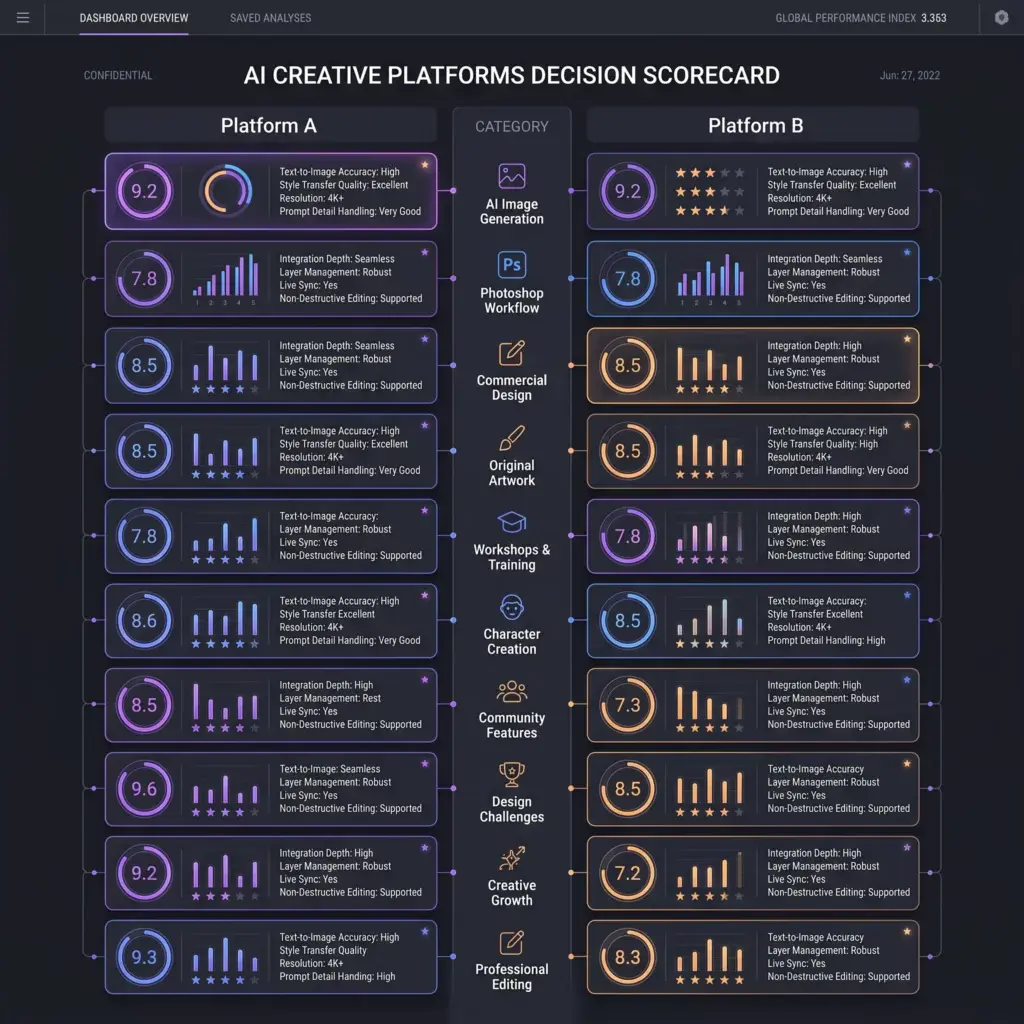
If you’re still deciding, here’s a quick recommendation based on your goals.
| If your priority is… | Recommended Platform | Why |
|---|---|---|
| Photoshop integration | Adobe Firefly | Built directly into Adobe workflows. |
| Creative Cloud workflow | Adobe Firefly | Seamless compatibility with Adobe apps. |
| Commercial marketing projects | Adobe Firefly | Strong professional design ecosystem. |
| Original AI artwork | Kre8or | Dedicated AI image creation platform. |
| Character creation | Kre8or | Better support for recurring visual identities. |
| Guided image refinement | Kre8or | Workshops simplify creative improvements. |
| Community features | Kre8or | Gallery, creator profiles, and remixing. |
| Design Challenges | Kre8or | Community competitions encourage creativity. |
| Creative growth | Kre8or | Focused on long-term creator development. |
| Independent creators | Kre8or | Built specifically for AI-first creative workflows. |
Best Platform by User Type
Different creators have different needs.
Here’s who each platform is best suited for.
🎨 Graphic Designers
Winner: Adobe Firefly
Designers already working in Photoshop, Illustrator, and Creative Cloud will likely benefit most from Firefly’s seamless integration.
📝 Bloggers
Winner: Kre8or
Bloggers often need unique featured images and illustrations rather than layered design files.
Our Kre8or for Bloggers guide explains how AI-generated visuals can make articles more engaging.
📺 YouTube Creators
Winner: Kre8or
Creators building thumbnails, recurring characters, and channel branding may appreciate Kre8or’s dedicated creative workflow.
See our Kre8or for YouTube Creators guide for practical examples.
📱 Social Media Managers
Winner: Adobe Firefly + Kre8or
A combined workflow often works best.
Use Kre8or for original artwork.
Use Adobe Firefly to integrate those visuals into wider Creative Cloud design projects.
💼 Small Businesses
Winner: Kre8or
Businesses wanting distinctive website graphics, blog illustrations, and marketing visuals without committing to the Adobe ecosystem may find Kre8or easier to adopt.
🏢 Creative Agencies
Winner: Adobe Firefly
Agencies already managing client projects through Creative Cloud can incorporate Firefly into existing production workflows with minimal disruption.
Frequently Asked Questions
Is Kre8or better than Adobe Firefly?
Neither platform is universally better.
Adobe Firefly excels at integrating AI into professional design workflows, while Kre8or focuses on original artwork, creator communities, and guided creativity.
Which platform is better for Photoshop users?
Adobe Firefly is the natural choice for creators who already rely on Photoshop and other Creative Cloud applications.
Which platform is better for AI artwork?
If your goal is creating original artwork and participating in a creative community, Kre8or offers features like Workshops, Gallery, Character Creation, and Design Challenges that extend beyond image generation.
Can I use both platforms together?
Absolutely.
Many creators generate original artwork in Kre8or and then continue refining or incorporating those visuals into larger commercial projects using Adobe’s creative applications.
Is Kre8or beginner-friendly?
Yes.
Studio and Workshops provide a structured workflow that makes AI image creation approachable even for users without professional design experience.
Which platform is better for businesses?
Businesses already invested in Adobe Creative Cloud may prefer Firefly.
Businesses focused on creating original visual content for blogs, social media, websites, and branding may appreciate Kre8or’s creator-first approach.
Final Recommendation
After comparing Kre8or and Adobe Firefly, one thing becomes obvious:
These platforms aren’t competing for exactly the same creators.
Adobe Firefly was designed to enhance an existing professional design workflow.
Kre8or was designed to build a complete AI-powered creative ecosystem from the ground up.
If your day revolves around Photoshop, Illustrator, Adobe Express, and Creative Cloud, Firefly fits naturally into tools you already know.
If your goal is creating original AI artwork, building a recognizable creator identity, and participating in a creative community, Kre8or offers a very different experience.
When Using Both Makes Sense
For many creators, choosing one platform isn’t necessary.
The two can complement each other remarkably well.
Graphic Designers
Generate original concepts in Kre8or.
Refine them inside Adobe Photoshop using Adobe Firefly and Creative Cloud tools.
This workflow combines creative exploration with professional production.
Bloggers
Use Kre8or for:
- Featured images
- Custom illustrations
- Hero graphics
- Unique blog artwork
Then use Adobe Express or Photoshop for:
- Text overlays
- Image resizing
- Social media versions
- Marketing materials
Our Kre8or for Bloggers guide explains this workflow in greater detail.
YouTube Creators
Develop recurring characters, thumbnail artwork, and creative concepts inside Kre8or.
If additional editing or compositing is needed, Adobe’s editing tools provide an excellent finishing environment.
Learn more in our Kre8or for YouTube Creators guide.
Marketing Teams
Generate original visuals with Kre8or.
Then incorporate those assets into larger Adobe-based marketing campaigns, presentations, and advertising projects.
This approach combines originality with professional production tools.
Why Kre8or Feels Different
Adobe Firefly is designed to improve professional design workflows.
Kre8or is designed to encourage creativity itself.
Instead of ending with an exported image, every creation can continue evolving through:
- Studio
- Workshops
- Gallery
- Creator Profiles
- Remixing
- Design Challenges
The result is a platform where creativity continues long after the first image has been generated.
That creator-focused philosophy is what makes Kre8or stand apart.
Final Verdict
Adobe Firefly is an outstanding choice for designers who already work within Adobe Creative Cloud.
Its integration with Photoshop, Illustrator, and other Adobe applications makes it one of the strongest AI-assisted design tools available for professional workflows.
Kre8or isn’t trying to replace Adobe.
Instead, it focuses on giving creators an environment where AI image generation becomes the beginning of a larger creative journey.
Through Studio, Workshops, Character Creation, Gallery, Design Challenges, and community collaboration, Kre8or offers a platform centered on creativity rather than production software.
If your priority is professional design integration, Adobe Firefly is difficult to beat.
If your priority is original AI artwork, creative growth, and a creator-first ecosystem, Kre8or offers one of the most distinctive experiences available today.
For many creators, the ideal workflow is to generate and develop original artwork in Kre8or, then finish commercial design projects inside Adobe Creative Cloud.
🏆 Overall Winner by Category
| Category | Winner |
|---|---|
| Photoshop Integration | 🏆 Adobe Firefly |
| Creative Cloud Workflow | 🏆 Adobe Firefly |
| Professional Editing | 🏆 Adobe Firefly |
| Commercial Design Projects | 🏆 Adobe Firefly |
| Marketing Production | 🏆 Adobe Firefly |
| Original AI Artwork | 🏆 Kre8or |
| Guided Creative Workflow | 🏆 Kre8or |
| Character Creation | 🏆 Kre8or |
| Workshops | 🏆 Kre8or |
| Community Features | 🏆 Kre8or |
| Creator Profiles | 🏆 Kre8or |
| Design Challenges | 🏆 Kre8or |
| Long-Term Creative Growth | 🏆 Kre8or |
🚀 Ready to Explore Kre8or?
The best way to decide if Kre8or fits your workflow is to experience it yourself.
With a free account, you can:
✅ Create original AI artwork
✅ Experiment with dozens of artistic styles
✅ Improve images through Workshops
✅ Build a public creator profile
✅ Publish work to the Gallery
✅ Participate in Design Challenges
Whether you’re a blogger, YouTuber, entrepreneur, marketer, or digital artist, spending a little time inside the platform is the fastest way to understand what makes Kre8or different.
👉 Create Your Free Kre8or Account Today
Continue Comparing AI Image Generators
Still researching your options? Continue exploring with these in-depth comparisons:
- ⭐ Kre8or vs Midjourney
- ⭐ Kre8or vs Leonardo AI
- ⭐ Kre8or vs Canva AI
- ⭐ Kre8or vs Ideogram
- ⭐ Kre8or vs ChatGPT Image Generator
Learn More About Kre8or
If you’d like to explore the platform further, these guides cover every major feature:
- ⭐ Kre8or AI Review — A complete overview of the platform.
- 🛠️ How to Use Kre8or Studio — Learn the core creation workspace.
- ✨ Kre8or Workshops Explained — Discover guided image improvements.
- 🖼️ Kre8or Gallery Explained — See how creators share and discover artwork.
- 🔄 Kre8or Remix System Explained — Learn how collaborative creativity works.
- 👤 Kre8or Character Creation — Build consistent AI characters.
- 🏆 Kre8or Challenges Explained — Compete in themed design competitions.
- 💳 Kre8or Pricing Explained — Compare plans, credits, and commercial rights.
- 💎 How Kre8or Credits Work — Understand the reward system.
- 💰 How to Make Money with Kre8or — Explore monetization opportunities.
- ❓ Kre8or FAQ — Answers to the most common questions.