
Kre8or Workshops Explained: Turning Images Into Finished Art
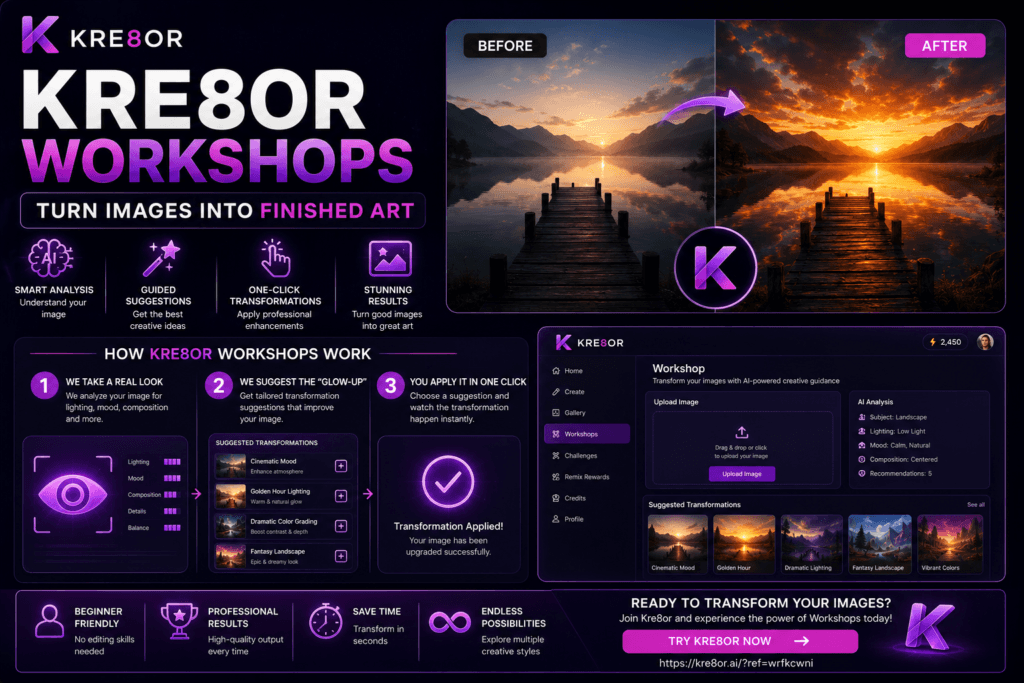
Most AI image tools focus on one thing:
Generating images from a prompt.
Kre8or introduces something very different called Workshops, and this feature changes how users interact with AI image creation entirely.
Instead of starting from scratch every time, Workshops allow you to:
- Upload an existing image
- Receive intelligent creative analysis
- Get guided transformation suggestions
- Apply professional-style enhancements in one click
- Turn a basic image into a polished final result
This turns Kre8or from a generator into a guided creative transformation system.
🚀 Try Kre8or Workshops Yourself
Want to see how Workshops can transform your own images?
👉 Create a free Kre8or account here:
Once you’re inside, upload an image and let the Workshop suggest professional improvements in just a few clicks.
What Are Kre8or Workshops?
Kre8or Workshops are structured AI-guided workflows that help you improve or transform images step by step.
Rather than relying on manual prompting, Workshops:
Study your image → Suggest improvements → Apply transformations automatically
Each Workshop acts like a creative director guiding your output toward a finished, professional look.

Watch the Transformation: Before & After Creativity
One of the most powerful aspects of Workshops is the before-and-after transformation system.
You can take:
- A simple photo
- A rough AI-generated image
- A basic composition
- A low-detail concept
And turn it into:
- A cinematic scene
- A professional editorial image
- A stylized artwork
- A polished marketing visual
The key idea is simple:
You don’t just generate images—you refine them into finished pieces.
If you’re still learning how to get the best results from the platform, check out our 25 Kre8or Tips and Tricks Every Creator Should Know for practical advice.
How Kre8or Workshops Work (Step-by-Step)
The Workshop system follows a structured 3-step workflow.
1. We Take a Real Look
When you upload an image, Kre8or doesn’t immediately apply a random style.
Instead, it analyzes:
- Subject of the image
- Lighting conditions
- Mood and atmosphere
- Composition strength
- What is working well
- What could be improved
This step is important because it makes the system feel context-aware rather than random.
Instead of guessing, Kre8or evaluates your image like a creative professional would.
2. We Suggest the “Glow-Up”
After analysis, Kre8or generates a short list of tailored transformation suggestions.
These are not generic filters.
They are specific creative directions such as:
- Golden Hour Lighting
- Cinematic Mood Enhancement
- Editorial Product Styling
- Background Recomposition
- Dramatic Color Grading
- Atmospheric Lighting Boost
Each suggestion is designed based on what your image actually needs.
This is where Workshops stand out.
Instead of forcing you to figure out prompts, Kre8or tells you:
“Here’s exactly what will improve this image.”
3. You Apply It in One Click
Once you select a suggestion:
- Kre8or applies the transformation automatically
- No prompt writing is required
- No trial-and-error adjustments
- No technical setup
The system handles everything in the background.
You simply choose:
“Yes, apply this transformation.”
And the image is upgraded instantly.
If you’re looking for inspiration before transforming your images, browse our 100 Amazing Kre8or Prompts You Can Copy Today.

Why Workshops Are Different From Traditional AI Image Tools
Most AI tools work like this:
- Write prompt
- Generate image
- Adjust prompt
- Generate again
- Repeat until satisfied
This process can be slow and inconsistent.
Kre8or Workshops remove that friction entirely.
Traditional AI Workflow
- Manual prompting
- Guesswork adjustments
- Repeated generation cycles
- Inconsistent results
Kre8or Workshop Workflow
- Upload image
- Get intelligent suggestions
- Apply transformation instantly
- Refine if needed
Key Difference
Traditional tools rely on user skill.
Workshops provide guided creative direction.
What Makes Kre8or Workshops Powerful
Workshops are not just filters or presets.
They function like a creative assistant that understands visual improvement.
1. Context-Aware Editing
Instead of applying the same effect to every image, Workshops:
- Analyze each image individually
- Adapt suggestions to the subject
- Focus on improving weak points
- Enhance strong visual elements
This makes results feel personalized.
2. Beginner-Friendly Design
Since Workshops reduce the need for advanced prompt engineering, they’re especially useful for creators who are just getting started with the platform. You can also read our Kre8or FAQ for answers to the most common beginner questions.
You don’t need to understand:
- Prompt engineering
- Lighting theory
- Composition rules
- Editing software
Kre8or handles that complexity for you.
3. Professional-Level Output
Even simple images can be transformed into:
- Editorial-style visuals
- Cinematic scenes
- High-impact marketing graphics
- Artistic compositions
This makes Workshops useful for both casual creators and professionals.
“Not Sure What Your Image Needs?” Kre8or Solves That
One of the biggest problems in creative editing is uncertainty.
Most users don’t know:
- What is wrong with their image
- How to improve lighting or mood
- What style fits best
Instead of asking you to decide, it says:
“We’ll show you what makes it better.”
This removes guesswork completely.
Use Cases for Kre8or Workshops
1. Social Media Content
Turn basic photos into:
- Instagram-ready visuals
- TikTok thumbnails
- Facebook posts
- Pinterest graphics
2. Marketing Images
Businesses can upgrade:
- Product photos
- Promotional banners
- Ad creatives
- Landing page visuals
3. AI Art Enhancement
AI-generated images can be refined into:
- More realistic compositions
- More cinematic scenes
- More polished artistic outputs
Once you’ve created an image you’re proud of, consider entering it into a Kre8or Challenge to compete for prizes and gain exposure within the community.
4. Personal Photography
Users can enhance:
- Portraits
- Travel photos
- Lifestyle shots
- Event images
Workshops vs Traditional Editing Tools
| Feature | Traditional Editing | Kre8or Workshops |
|---|---|---|
| Skill Required | High | Low |
| Time Needed | Long | Fast |
| Prompting Needed | Yes | No |
| Guidance | None | AI-driven |
| Results Consistency | Variable | High |
| Learning Curve | Steep | Easy |
Ready to Try the Workshop?
👉 Create your free Kre8or account and explore Workshops for yourself:
Pros & Cons of Kre8or Workshops
Pros
1. Fully Guided Workflow
No need for prompt engineering or editing skills.
2. Smart Image Analysis
AI evaluates lighting, mood, and composition.
3. One-Click Transformations
Apply professional-level enhancements instantly.
4. Beginner Friendly
Perfect for users without technical experience.
5. Fast Iteration
Quickly test multiple creative directions.
Cons
1. Less Manual Control
Advanced users may want deeper fine-tuning options.
2. Dependent on AI Suggestions
Quality depends on how well suggestions match creative intent.
3. Learning System Behavior
Users still need time to understand how Workshops think.
Final Verdict: Are Kre8or Workshops Worth It?
Kre8or Workshops are one of the most practical and unique features in the platform because they change how users approach image creation.
Instead of:
“How do I prompt this correctly?”
You get:
“Here are the best ways to improve this image—choose one.”
This shift makes AI image creation:
- Faster
- More intuitive
- More consistent
- Less technical
Related Kre8or Guides
- Kre8or AI Review
- Kre8or FAQ
- How Kre8or Credits Work
- Kre8or Challenges Explained
- 25 Kre8or Tips and Tricks Every Creator Should Know
- 100 Amazing Kre8or Prompts You Can Copy Today
Bottom Line
Kre8or Workshops turn AI image generation into a guided creative transformation system rather than a prompt-based guessing game.
By combining:
- Image analysis
- Smart suggestions
- One-click transformations
- Before-and-after upgrades
It gives creators a simple but powerful way to turn ordinary images into polished, professional results without needing technical skills.
To better understand how the platform works behind the scenes, read our How Kre8or Credits Work guide.
Ready to Transform Your Images?
👉If you’d like to experience Kre8or Workshops yourself, you can create a free account here:
Then upload an image, explore the Workshop suggestions, and see how quickly you can turn a good image into a polished final result.
Frequently Asked Questions
Is Kre8or Workshop free?
New users can explore Kre8or with free access, although some features may require credits depending on your plan.
Does the Workshop require prompt writing?
No. One of its biggest advantages is that it suggests improvements automatically, reducing the need for complex prompt engineering.
Can I upload my own images?
Yes. The Workshop is designed to analyze uploaded images and recommend improvements based on lighting, composition, and style.
Is the Workshop good for beginners?
Absolutely. It removes much of the guesswork from AI image editing, making it accessible even if you’ve never used an AI art tool before.