
Whether you’re brand new to Kre8or or already creating AI artwork every day, there are plenty of small techniques that can make a big difference.
The best images don’t always come from longer prompts—they often come from smarter workflows, better experimentation, and making the most of Kre8or’s creator-focused features.
Here are 25 tips and tricks to help you create better images, save time, and get more value from the platform.
1. Start with a Simple Prompt

Don’t overcomplicate your first prompt.
Start with the main subject and build from there.
Example:
A futuristic coffee shop on Mars
Once you have a good result, add more details.
2. Add Lighting to Improve Realism
Lighting dramatically changes the final image.
- Golden hour
- Soft morning light
- Cinematic lighting
- Studio lighting
- Neon lights
- Sunset glow
3. Describe the Mood
Mood helps shape the atmosphere.
Examples include:
- Peaceful
- Dramatic
- Mysterious
- Cozy
- Epic
- Dreamlike
4. Experiment with Camera Angles
Instead of always describing the subject, describe how it’s viewed.
Examples:
- Close-up
- Wide-angle
- Bird’s-eye view
- Low angle
- Macro shot
5. Don’t Chase the Perfect Prompt
Most great images come after a few refinements.
Small changes often produce surprisingly different results.
6. Use Workshop Transformations
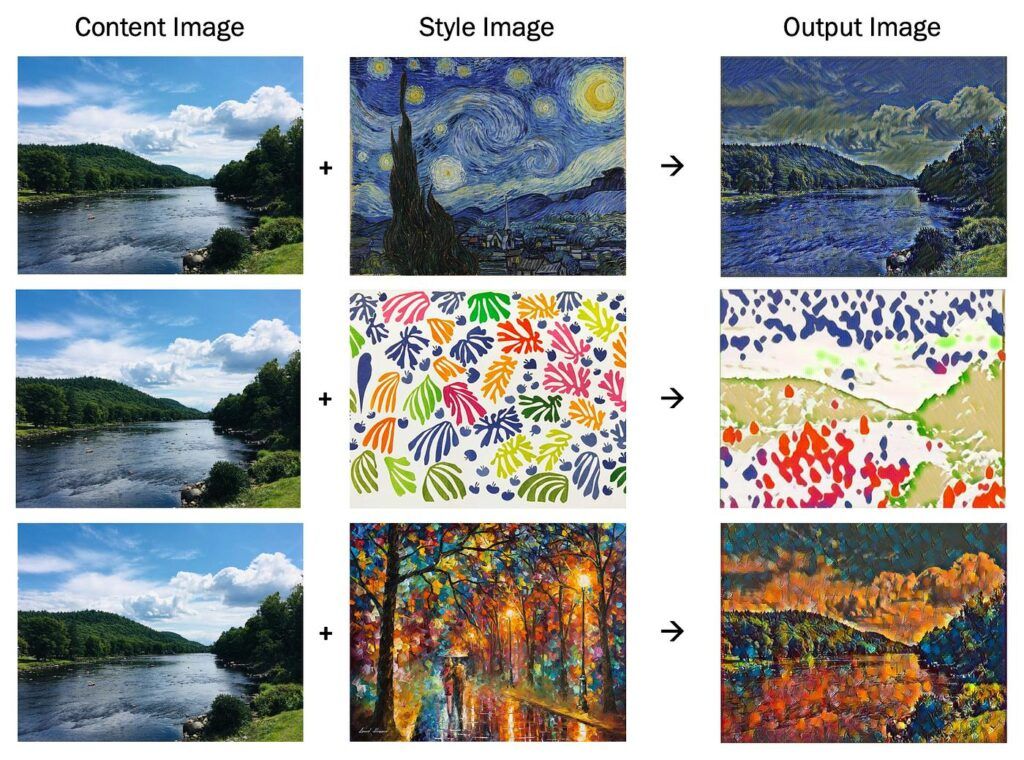
One of Kre8or’s standout features is Workshop Transformations.
Instead of starting over, you can apply different artistic styles to an existing creation with just a click, making it easy to explore new creative directions.
7. Save Your Best Prompts
When you discover a prompt that consistently produces great results, save it.
Building your own prompt library can save hours in the future.
8. Publish Your Best Work
Don’t let your favorite creations sit in a folder.
Publishing them to the Kre8or Gallery lets other creators discover your work and showcase your creativity.
9. Encourage Remixes
Every time another creator remixes your published artwork, you earn +5 credits.
Creating images that inspire others is a great way to stay active in the community.
10. Explore Other Creators’ Work
The public gallery isn’t just for inspiration.
It’s also a great place to discover new styles, compositions, and creative ideas.
11. Build a Consistent Style
Whether you’re creating fantasy art, product images, or marketing graphics, consistency helps establish your personal brand.
12. Keep Prompts Clear
Avoid stuffing too many unrelated ideas into one prompt.
Simple, focused prompts usually produce better results.
13. Use Colors Intentionally
Mention colors when they’re important.
Examples:
- Emerald green
- Deep blue
- Matte black
- Gold accents
- Pastel colors
14. Think Like a Photographer
Describe the scene as if you’re directing a photo shoot.
Consider:
- Lighting
- Composition
- Background
- Subject
- Focus
15. Try Multiple Variations
If your first result isn’t exactly what you imagined, create another version.
Experimentation is part of the creative process.
16. Use Kre8or for More Than Art
Kre8or can help create visuals for:
- Blog posts
- YouTube thumbnails
- Website banners
- Marketing campaigns
- Product mockups
- Social media graphics
- Presentations
17. Join Design Challenges
Upcoming Design Challenges give creators an opportunity to compete for credit prize pools while exploring new creative ideas.
18. Build Your Creator Portfolio
Every published image helps build your public portfolio and makes it easier for others to discover your work.
19. Share Your Creations
Posting your artwork on social media can help grow your audience while bringing more attention to your creator profile.
20. Refer Other Creators
If you enjoy using Kre8or, you can invite others through the referral program and earn commissions that can be redeemed in real USD.
21. Create in Series
Instead of making one image, create a collection around the same theme.
Series often have a stronger visual impact than individual images.
22. Use AI for Brainstorming
Even if the first image isn’t perfect, it can spark your next great idea.
AI is an excellent creative partner.
23. Keep Learning
Every week you’ll discover new prompt techniques and creative styles.
The more you experiment, the better your results become.
24. Don’t Be Afraid to Experiment
Some of the most impressive AI images come from unusual prompt combinations.
Creativity often starts with curiosity.
25. Have Fun
The best creators are the ones who keep exploring.
Don’t worry about making every image perfect.
Enjoy the process, learn from each creation, and continue developing your own artistic style.
Final Thoughts
Kre8or offers much more than AI image generation.
With Workshop Transformations, a public creator gallery, remix rewards, Design Challenges, creator portfolios, and referral commissions, it’s designed to support creators long after an image is generated.
Whether you’re creating content for business, social media, YouTube, blogging, or personal projects, these 25 tips will help you get more from the platform and continue improving your creative workflow.
As Kre8or evolves, we’ll keep updating this guide with new tips, features, and best practices—so be sure to check back for the latest advice.