
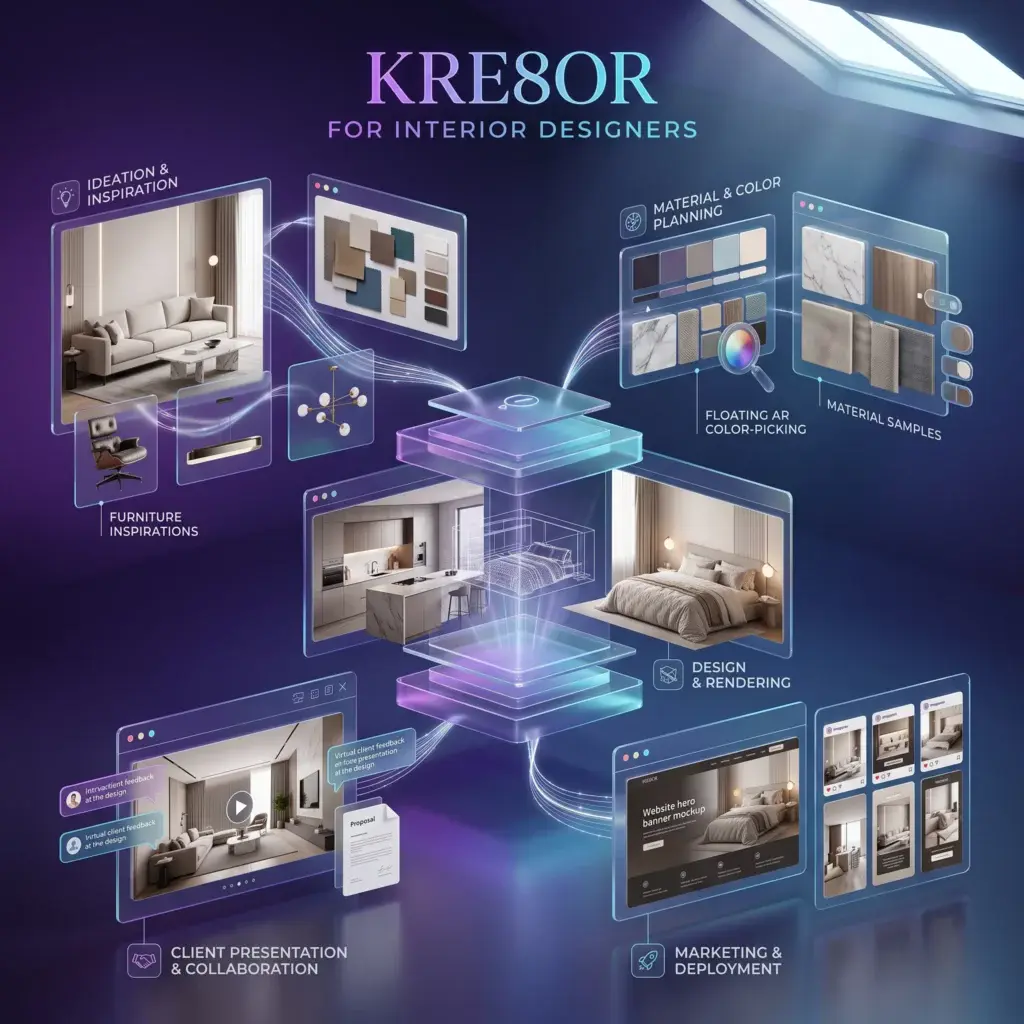
Quick Summary
Kre8or can help interior designers create polished mood boards, room concepts, client-presentation visuals, website graphics, and branded marketing assets while professional plans, measurements, sourcing, and specifications remain under the designer’s control.
How to Use Kre8or for Interior Designers
Why Interior Designers Benefit from AI-Assisted Visual Creation
Interior design is a visual service, but not every useful visual needs to be a final photorealistic rendering. During discovery, marketing, and early concept development, clients often need a clear emotional direction before they are ready to review exact products, dimensions, or construction details.
Kre8or can speed up this early-stage communication. It can help a designer demonstrate atmosphere, color direction, material character, lighting mood, and styling possibilities. That makes it useful for residential studios, commercial designers, decorators, staging professionals, kitchen specialists, hospitality teams, and independent consultants.
Best practice: Treat generated imagery as concept inspiration. Final design decisions should always be based on verified measurements, real materials, accurate specifications, budgets, building requirements, and products that can actually be sourced.
High-Value Uses for Interior Design Businesses
| Business Need | What Kre8or Can Create | How to Use It |
|---|---|---|
| Early concept development | Style directions, room atmospheres, color stories | Use during discovery calls and first-round presentations. |
| Client communication | Presentation covers, section dividers, lifestyle visuals | Combine with plans, budgets, schedules, and sourcing details. |
| Marketing | Social posts, blog images, service graphics, ad concepts | Maintain a consistent visual identity across channels. |
| Lead generation | Downloadable guides, checklists, consultation promotions | Use as opt-in assets and landing-page support. |
| Website design | Hero imagery, category banners, editorial illustrations | Use where original project photography is unavailable. |
Create Better Mood Boards
A mood board should communicate more than a collection of attractive pictures. It should establish a coherent design direction. Begin by defining the room type, client profile, architectural context, desired feeling, palette, materials, and level of formality.
Useful mood-board directions include warm minimalism, modern organic, transitional luxury, Scandinavian calm, contemporary coastal, boutique hotel, refined industrial, desert modern, classic European, and high-contrast modern.
Example Mood-Board Prompt
Editorial interior design mood board for a sophisticated modern-organic living room, warm limestone, natural oak, boucle upholstery, handwoven wool textures, sculptural lighting, muted sand and charcoal palette, premium residential design presentation, balanced composition, realistic materials, elegant negative space, no people, no text.
Develop Room Concepts More Efficiently
Room concepts work best when prompts describe the design problem rather than simply naming a style. Include the room type, approximate scale, architecture, natural-light direction, core materials, furniture character, palette, and intended mood.
- Living rooms: seating arrangement, focal point, circulation, texture, and lighting.
- Kitchens: cabinet style, worktop material, backsplash, island proportions, and daylight.
- Bedrooms: headboard treatment, layered textiles, ambient lighting, and storage character.
- Commercial spaces: customer journey, brand mood, durability, and visual hierarchy.
- Hospitality interiors: memorable arrival moments, comfort, atmosphere, and brand storytelling.
Build Premium Client Presentations
Use generated visuals to establish a consistent look across proposal covers, concept chapters, design narratives, room introductions, and closing slides. A strong presentation can include a cover image, project vision, palette, material direction, key references, furniture strategy, lighting approach, and next steps.
Presentation tip: Use the same palette, lighting mood, aspect ratio, and editorial treatment throughout a deck. Consistency makes even simple slides feel intentional and premium.
Create Website and Social Media Assets
Interior designers often run out of original project photography between major installations. Kre8or can fill supporting-content gaps with conceptual graphics for design education, trend commentary, consultation offers, seasonal styling, and service explanations.
- Homepage and service-page banners
- Blog featured images
- Instagram carousels
- Pinterest graphics
- Email newsletter headers
- Consultation advertisements
- Downloadable guides
- Workshop promotions
Workflow
Prompt Formula for Interior Designers
[room or asset type] + [design style] + [architectural context] + [materials] + [color palette] + [lighting] + [mood] + [composition] + [intended marketing use] + no people + no text
Common Mistakes to Avoid
- Presenting a generated concept as a guaranteed final outcome.
- Ignoring real dimensions, structure, accessibility, or code requirements.
- Showing furniture or finishes that cannot be sourced.
- Using inconsistent styles from one client slide to the next.
- Allowing visual novelty to override the client brief.
- Replacing accurate plans or professional renderings with inspiration imagery.
Frequently Asked Questions
Can interior designers use Kre8or for paid client projects?
Yes, particularly for inspiration, early concept communication, mood boards, and presentation artwork. Verify the platform’s current commercial-use terms before delivering or licensing final assets.
Can Kre8or replace CAD or rendering software?
No. It is not a substitute for accurate floor plans, technical drawings, specifications, or spatially precise renderings.
Can generated imagery be included in a portfolio?
It can be shown as conceptual work when clearly labeled. Do not present it as a completed installation or real client project.
How can designers maintain a consistent style?
Reuse a defined palette, material vocabulary, lighting direction, camera angle, and prompt structure. Save successful prompts as reusable brand templates.
What is the safest way to present concepts to clients?
Label them as inspiration or AI-assisted concepts, then pair them with verified plans, actual samples, sourcing options, and realistic budget information.
Related Guides
Ready to Create Better Visual Content?
Use Kre8or to develop original branded graphics, campaign concepts, website visuals, and reusable creative workflows.
Try Kre8or Free